

Prerequisites
Before setting up tracing, ensure you have:- Claude Code CLI installed.
- A LangSmith API key.
- Node.js installed.
Getting started
From within Claude Code, run: If you are migrating from the previously recommended version of tracing Claude Code with manually created stop hooks, see Migrating from the manual stop hook.
Setting environment variables
Option 1: Project-level configuration (recommended) The plugin requires the following environment variables:TRACE_TO_LANGSMITH: "true"- Enables tracing for this project. Remove or set tofalseto disable tracing.CC_LANGSMITH_API_KEY- Your LangSmith API keyCC_LANGSMITH_PROJECT- The LangSmith project name where traces are sent- (optional)
CC_LANGSMITH_DEBUG: "true"- Enables detailed debug logging. Remove or set tofalseto disable debug logging.
.claude/settings.local.json in your project directory and populate it as follows:
Alternatively, to enable tracing to LangSmith for all Claude Code sessions, you can add the above JSON to your global Claude Code settings.json file.
~/.zshrc, ~/.bashrc, or ~/.bash_profile):
Verify setup
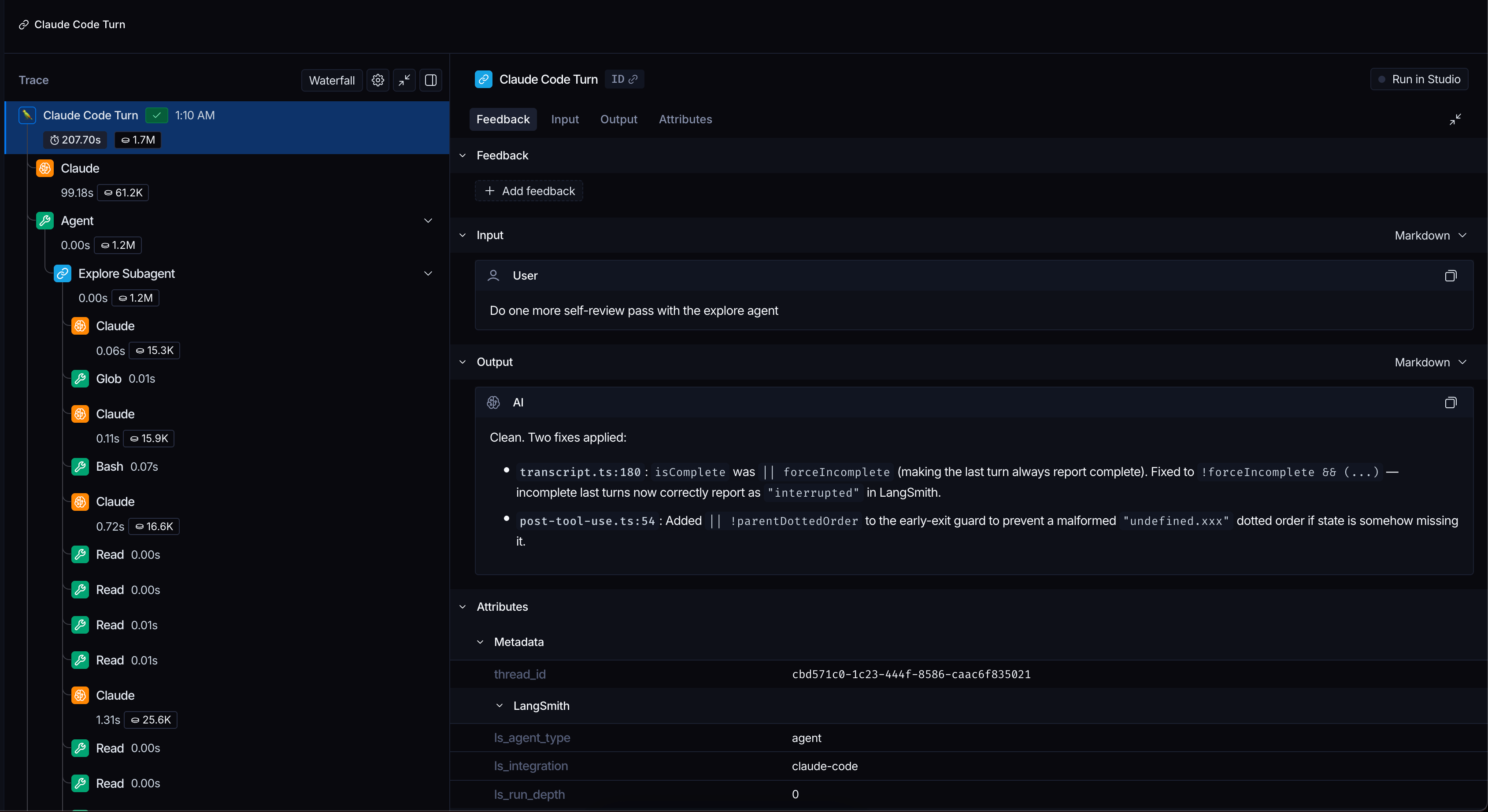
Traces will appear complete in LangSmith after Claude Code responds. Note that if you interrupt a run while it is in progress, the plugin will only flush that run when you send the next message or end the session. In LangSmith, you’ll see:- Each message to Claude Code appears as a trace.
- All turns from the same Claude Code session are grouped using a shared
thread_idand can be viewed in the Threads tab of a project.
Nesting traces under an existing run
You can also set an environment variable namedCC_LANGSMITH_PARENT_DOTTED_ORDER to nest all Claude Code traces as children of an existing LangSmith run. This is useful when Claude Code is invoked programmatically as part of a larger traced workflow.
Python
Troubleshooting
No traces appearing in LangSmith
-
Check the hook is running:
You should see log entries after each Claude response.
-
Verify environment variables:
- Check that
TRACE_TO_LANGSMITH="true"in your project’s.claude/settings.local.json - Verify your Personal Access Token (PAT) is correct (starts with
lsv2_pt_) - Ensure the project name exists in LangSmith
- Check that
-
Enable debug mode to see detailed API activity:
Then check logs for API calls and HTTP status codes.
Subagent runs do not appear after user interruption
Currently, subagents are only traced upon completion. This means if you interrupt a conversation turn in the middle of a subagent run, the subagent’s child runs will not be traced.Managing log file size
The hook logs all activity to~/.claude/state/hook.log. With debug mode enabled, this file can grow large:
Migrating from the manual stop hook
If you were using the previous version of tracing Claude Code with LangSmith, you will need to remove~/.claude/hooks/stop_hook.sh and remove the reference to the hook from any previous settings.local.json or settings.json files you added it to previously, then following the plugin installation instructions above.
Source code
The plugin is open-source under the MIT license and is available in this GitHub repo.Connect these docs to Claude, VSCode, and more via MCP for real-time answers.